

Minecraft information overlay
Hwyla Mod
See contextual information about what you are looking at in Minecraft with the Waila-derived Hwyla overlay. Use the supplied download source and match the file to your loader and game version.

Forge files listed Fabric files listed Legacy project Supplied CurseForge source
What is Hwyla?Core idea Project files
A compact information overlay for modded Minecraft
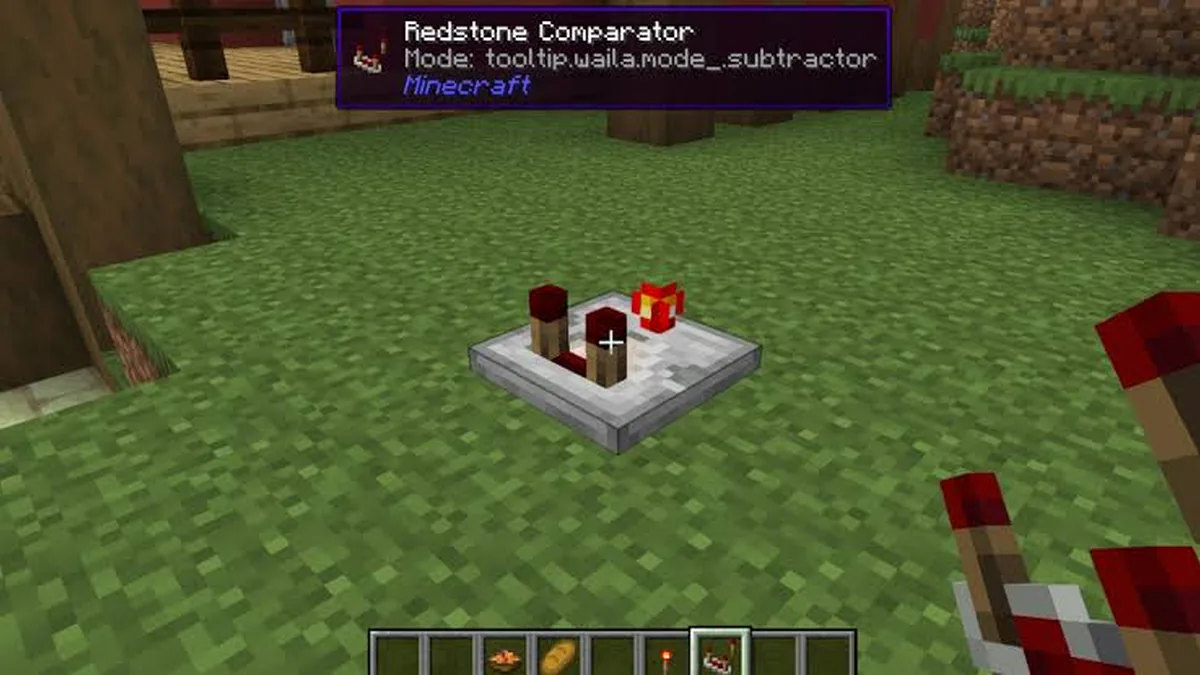
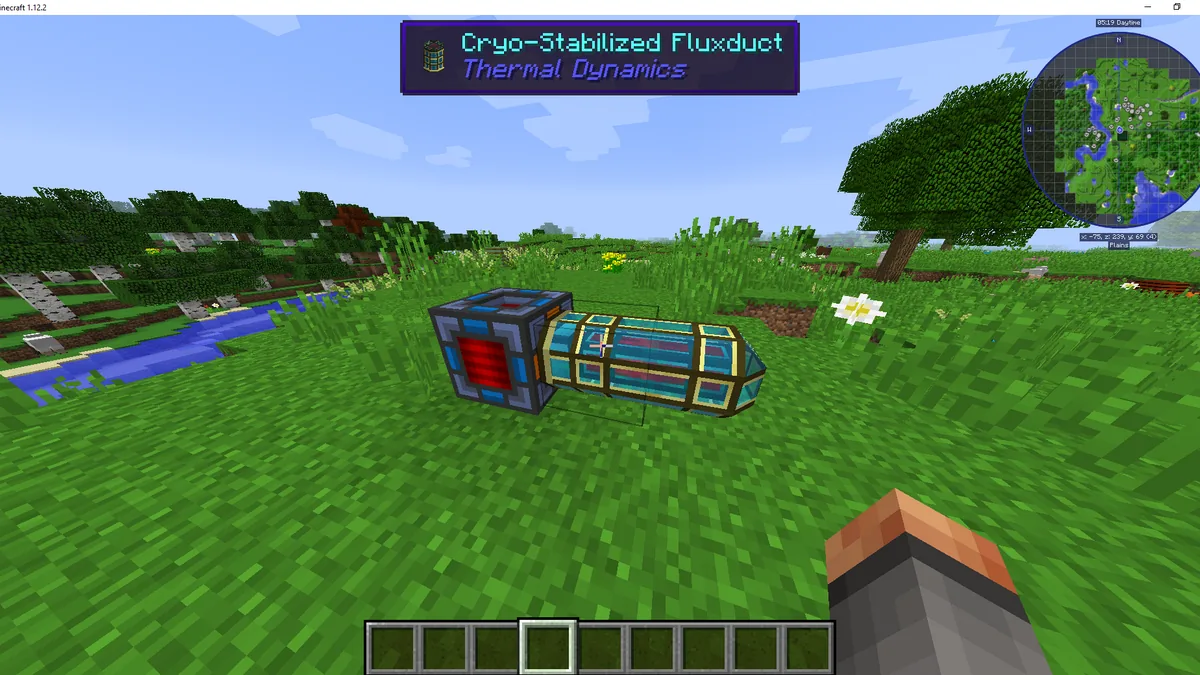
Hwyla stands for “Here’s What You’re Looking At.” The project is a fork of Waila and is designed to present useful information about the block or object under your crosshair.
Information while you play
Keep contextual block details visible in the game view instead of relying only on menus or memory.
Forge and Fabric
The public project listing includes builds for both loaders across supported historical Minecraft releases.
Features
Stay informed without breaking your flow
Look-at block information
Shows contextual information for the block or object you are looking at, keeping useful details in the game view.
Waila-derived overlay
Hwyla is a fork of Waila and continues the familiar information-overlay approach for supported Minecraft versions.
Configurable presentation
The project includes in-game options for changing tooltip formatting and display behavior.
Forge and Fabric files
The project page provides files for both Forge and Fabric across supported releases; choose the file that matches your loader.
How it works
From setup to in-game context in four steps
1
Choose the correct file
Use the main download source, then confirm the Minecraft version and loader match your setup.
2
Place the mod file
Follow the normal mod-loader workflow for your Minecraft installation; keep the downloaded JAR intact.
3
Launch Minecraft
Start the matching Forge or Fabric profile and load a world only after the loader setup is working.
4
Adjust the overlay
Use Hwyla/Waila options in game to tune tooltip formatting and supported display settings.
Use cases
Useful context, right where you need it
Hwyla keeps helpful block information close to the action, making older modded Minecraft setups easier to read, explore and personalize.
Instant block context
Identify what you are looking at without constantly leaving the world view or opening extra menus.
Navigate modded worlds
Use on-screen information as a quick reference when exploring packs with unfamiliar or similarly styled blocks.
Shape the overlay
Fine-tune supported tooltip formatting so the information layer feels more natural in your setup.
Benefits
More context, less interruption
Information in context
Keep block details close to what you are looking at instead of switching away from gameplay.
Less guesswork
Useful labels can make unfamiliar blocks easier to recognize while exploring or building.
Personal display control
Formatting options let you adapt the tooltip presentation to your preference.
Installation
Set up Hwyla with a matching mod profile
1
Choose the correct file
Use the main download source, then confirm the Minecraft version and loader match your setup.
2
Place the mod file
Follow the normal mod-loader workflow for your Minecraft installation; keep the downloaded JAR intact.
3
Launch Minecraft
Start the matching Forge or Fabric profile and load a world only after the loader setup is working.
4
Adjust the overlay
Use Hwyla/Waila options in game to tune tooltip formatting and supported display settings.
Get Hwyla
Download Hwyla Mod
Bring contextual block information into supported modded Minecraft setups with Hwyla’s Waila-derived overlay. Before adding it to your profile, confirm that the selected file matches both your Minecraft version and mod loader.
Hwyla is no longer maintained. The project page lists its final updates in 2020, so do not assume compatibility with newer Minecraft releases.
Download Hwyla Mod
Safety & download information
Keep your modded setup predictable
Use the supplied source
The main download button uses the exact CurseForge API download URL supplied for this site.
Check loader and game version
A valid Hwyla file can still fail to load if the Minecraft version or loader does not match.
Back up important worlds
Before changing a modded setup, keep a backup of worlds and configuration you cannot afford to lose.
Pros and cons
Hwyla Mod Pros and Cons
Pros
- Contextual block information in the game view.
- Forge and Fabric builds are documented on the public project listing.
- Tooltip presentation includes configurable formatting options.
Cons
- The project is no longer maintained.
- Modern Minecraft versions are not listed on the legacy project page.
- Using the wrong loader or Minecraft version can prevent the mod from loading.
Guides
Explore Hwyla setup, loaders, features and troubleshooting
Guide
Hwyla Mod Features: What the Overlay Can Show
A practical look at Hwyla Mod features, including the in-game information overlay, tooltip controls and documented integrations.
Read guide →Guide
Hwyla Mod Forge Guide: Choosing the Right File
Learn how to approach Hwyla Mod Forge downloads, version matching and loader selection without mixing incompatible builds.
Read guide →Guide
Hwyla Mod Fabric Guide: Loader and Version Basics
Understand Hwyla Mod Fabric file selection and the key checks to make before adding it to a Fabric profile.
Read guide →FAQ
Hwyla Mod questions
Clear answers to common questions about Hwyla, setup, loaders and older Minecraft versions.
About Hwyla
Hwyla, “Here’s What You’re Looking At,” is a Minecraft UI information mod and a fork of Waila. It displays contextual information about what you are looking at.
Its core purpose is to show information about the block or object under your crosshair in an in-game tooltip.
The public CurseForge project page states that the author is no longer maintaining the project; the last listed update is from August 2020.
Yes. The public project listing includes Forge files. Select a build that matches your Minecraft version.
Yes. The public project listing includes Fabric files for supported releases.
No. Hwyla is a fork of Waila, designed around the same “what am I looking at” information-overlay concept.
The project description notes in-game formatting options, including tooltip color and text-formatting controls.
The project description documents recipe lookup keys when JEI is installed, so that specific integration depends on JEI being present.
The supplied project source describes a Forge/Fabric Java mod and does not document Minecraft Bedrock support.
Use the Download section on this site, which points to the exact CurseForge download URL supplied for this project.
Install & Compatibility
Install the matching Forge or Fabric loader, download the correct Hwyla JAR for your Minecraft version, and place it using your loader’s standard mods workflow.
The most common first checks are a version mismatch, using the wrong loader build, or an incomplete mod-loader setup.
No. Use the build made for the loader in your profile.
No. Forge and Fabric builds are loader-specific.
The public CurseForge listing includes historical files from Minecraft 1.10.2 through 1.16.x-era versions. Check the project file list for the exact build you need.
The project page used for this site does not list 1.20.1 among its Hwyla files, so this site does not claim an official 1.20.1 build.
The project listing used here does not show a Hwyla 1.18.2 release, so this site does not present one as an official Hwyla file.
No such Hwyla release is documented on the project listing used here. Avoid treating unrelated downloads as official Hwyla releases.
Back up important worlds and configuration files, then change one component at a time so problems are easier to isolate.
Hwyla itself is no longer maintained. For newer game versions, research currently maintained information-overlay mods that explicitly support your exact Minecraft version and loader.